
Set up your Sui wallet and node
To deploy Sui DeFi primitives for yield, you first need a compatible wallet and a reliable connection to the blockchain. This setup ensures you can interact with smart contracts securely and verify your transactions in real time.

Download an official Sui wallet such as Sui Wallet or Ethos from the official Sui website or your device’s app store. These wallets support the Move programming language used by Sui smart contracts. During installation, write down your seed phrase on paper and store it offline. Never share this phrase with anyone or enter it into a web form.
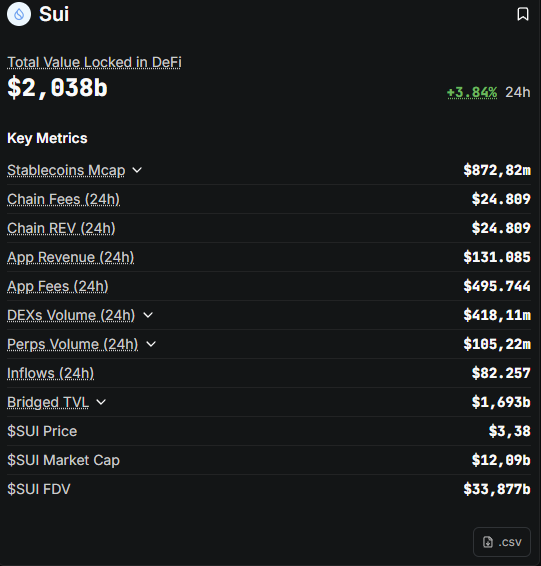
Transfer SUI tokens to your new wallet address to cover transaction fees and initial deposits. You can acquire SUI from centralized exchanges like Coinbase or Binance, or swap other tokens using a decentralized exchange. Ensure you send the tokens via the Sui network (Sui Mainnet) to avoid loss.

Most wallets connect automatically to public Sui nodes. For advanced users deploying complex primitives, consider running a local node or using a dedicated RPC provider like Mysten Labs’ Sui RPC endpoint for faster, more reliable connectivity. Verify your connection by checking your wallet balance and network status in the settings.
Enable two-factor authentication (2FA) if supported by your wallet. Review your network permissions to ensure you are connected to the Sui Mainnet, not a testnet, unless you are developing. Check that your wallet software is up to date to protect against known vulnerabilities.
With your wallet funded and connected, you are ready to interact with Sui’s DeFi primitives. The next step is to identify the specific yield-generating protocols that align with your risk tolerance and investment goals.
Fund your account with SUI tokens
Before you can deploy any DeFi primitives on Sui, you need SUI tokens in your wallet. The network requires SUI for two things: paying transaction gas fees and staking to secure the network. Without a balance, your smart contract interactions will fail immediately.
Acquire SUI tokens
You can buy SUI on major centralized exchanges like Coinbase, Binance, or Kraken. Search for the SUI/USD or SUI/USDT pair and execute a buy order. Ensure the exchange supports withdrawals to the specific wallet type you plan to use (e.g., MetaMask, Sui Wallet, or Ethos).
Transfer to your wallet
Once purchased, withdraw the tokens to your wallet address. Copy your public address from your wallet app and paste it into the exchange's withdrawal field. Select the Sui network (Sui Chain) for the transfer. Using the wrong network will result in permanent loss of funds.
Keep extra for gas
Always transfer slightly more than your estimated cost. Sui charges gas fees for every transaction, including deploying contracts and interacting with DeFi protocols. A small buffer ensures your transactions don't revert due to insufficient balance.
Interact with DeepBook liquidity pools
DeepBook is Sui’s native decentralized exchange primitive, designed to provide shared liquidity across all applications built on the network. Unlike traditional AMMs that isolate liquidity in separate pools, DeepBook functions as a centralized-limit-order-book (CLOB) infrastructure. This allows different DeFi protocols to tap into the same liquidity depth, reducing slippage and improving capital efficiency for yield strategies.
To interact with DeepBook, you must use its specific SDK and understand the two main primitives: Spot and Margin. The Spot primitive handles standard token swaps and liquidity provision, while the Margin primitive introduces built-in leverage capabilities. Builders and users alike rely on these primitives to execute trades without fragmenting liquidity across multiple isolated chains or sidechains.
Step 1: Initialize the DeepBook client
Before adding liquidity, you need to initialize a client that connects to the correct DeepBook pool. This involves importing the DeepBook SDK into your Sui Move project or frontend application. You must specify the pool ID and the trading pair (e.g., SUI/USDC). Ensure your wallet is connected to the Sui network (testnet or mainnet) and has sufficient balance for transaction fees and initial liquidity deposits.
Use your package manager to install the official DeepBook client library. This SDK provides the necessary functions to interact with the on-chain order book. Import the client and configure it with your network endpoint (e.g., https://fullnode.mainnet.sui.io). Verify the connection by fetching the current state of the pool you intend to use.
Link your Sui-compatible wallet (such as Sui Wallet or Ethos) to your application. Check your balance for both assets involved in the liquidity pool (e.g., SUI and USDC). DeepBook requires proportional deposits of both tokens to create a valid liquidity position. Ensure you have extra SUI for gas fees.

Call the add_liquidity function from the DeepBook SDK. Pass the amount of each token you wish to deposit. The protocol will mint LP tokens (or a similar receipt) representing your share of the liquidity pool. This position earns trading fees proportional to your contribution. You can now withdraw or adjust this position later.
Use the DeepBook dashboard or your application’s UI to track your liquidity position. Monitor the price range of your order book entries. If the market moves outside your specified range, your liquidity may become inactive. Adjust your positions as needed to maintain yield generation and minimize impermanent loss.
Understanding Order Book Mechanics
DeepBook’s order book mechanics differ significantly from automated market makers (AMMs). In an AMM, prices are determined by a mathematical formula based on token reserves. In DeepBook, prices are determined by limit orders placed by users and market makers. This allows for more precise price discovery and deeper liquidity at specific price points.
When you add liquidity to DeepBook, you are essentially providing the capital that market makers use to fill these orders. The shared liquidity model means that your funds are not locked in a single pool but are accessible to any application that integrates with DeepBook. This increases the potential for yield but also introduces complexity in managing risk across different protocols.
Leveraging Margin Primitives
For users seeking higher yields, DeepBook’s Margin primitive offers built-in leverage. This allows you to borrow assets against your collateral to increase your trading volume or liquidity provision. However, leverage amplifies both gains and losses. Ensure you understand the liquidation thresholds and interest rates associated with the Margin primitive before deploying capital.



As an Amazon Associate, we may earn from qualifying purchases.
Deploy Move smart contracts for yield
Building yield strategies on Sui requires writing Move smart contracts that leverage the network’s unique object model. Unlike EVM chains that rely on monolithic storage, Sui treats assets as distinct objects with explicit ownership. This architecture allows for parallel processing and eliminates the reentrancy vulnerabilities that have plagued other ecosystems.
To begin, you need a development environment. Install the Sui CLI and initialize a new Move package using sui move new. This sets up the standard directory structure, including sources, tests, and Move.toml. You will write your yield logic in .move files within the sources directory.
Start by defining the structs for your yield-bearing assets. Use struct with key and drop capabilities to ensure your tokens are unique and can be destroyed when no longer needed. For example, if you are creating a yield token, define a YieldToken struct that tracks the underlying principal and accrued interest.
Write the core functions that manage the yield. This might include deposit, withdraw, and claim_interest. Because Sui supports parallel execution, you can design these functions to operate on independent objects, allowing multiple users to interact with the contract simultaneously without locking the entire system.
Before deploying, run sui move test to verify your logic. Use the Sui Move framework to simulate transactions and check for edge cases. Pay special attention to ownership transfers and event emissions, which are critical for tracking user activity on-chain.
Once your tests pass, deploy the package to the Sui network using sui client publish. You can choose to deploy to the testnet first for further validation. After deployment, you will receive a package ID, which you will use to interact with your contract from wallets or other applications.
Once deployed, your contract can be composed with other Sui DeFi primitives. Sui’s object-centric design means your yield strategy can easily interact with lending protocols, DEXs, or staking contracts. This composability allows you to build complex financial instruments that are both efficient and secure.
For more details on how Sui primitives facilitate DeFi growth, refer to the official Sui blog How Sui Primitives Help DeFi Flourish. Their documentation provides deep dives into object ownership and shared state management, which are essential for building robust yield strategies.
Monitor positions and manage risk
Once your Sui DeFi primitives are deployed, the work shifts from setup to maintenance. Yield farming and liquidity provision are not passive activities; they require active oversight to protect capital against impermanent loss, gas spikes, and protocol updates. In the 2026 landscape, where new primitives like DeepBook Margin and automated liquidity vaults are emerging, staying informed is part of your risk management.
Track impermanent loss and rebalance
Impermanent loss occurs when the price ratio of deposited assets changes compared to when you deposited them. In concentrated liquidity pools, this effect is amplified. Monitor your positions regularly using on-chain explorers or portfolio trackers. If the divergence exceeds your risk tolerance, rebalance by withdrawing and redepositing in a new ratio, or exit the pool entirely. Use Sui’s high throughput to execute rebalances efficiently during low-traffic windows.
Watch gas fees and network congestion
Sui’s transaction fees are generally low, but spikes can occur during high-demand periods or when new complex primitives launch. Check the current gas price before executing large rebalances or withdrawals. Timing your transactions during off-peak hours can save significant costs. Keep an eye on official Sui announcements for network upgrades that might temporarily affect throughput or fee structures.
Stay updated on protocol changes
DeFi protocols evolve rapidly. New features, bug fixes, or parameter changes can impact your yield or risk profile. Subscribe to official Sui blog updates and protocol-specific announcements. For example, the February 2026 update introduced DeepBook Margin and new yield pool integrations, which may offer better opportunities or require adjustments to existing positions. Ignoring these updates can lead to missed optimizations or unexpected risks.
Risk management checklist
-
Review positions weekly for impermanent loss
-
Monitor gas prices before rebalancing
-
Subscribe to Sui and protocol announcements
-
Set price alerts for underlying assets
-
Test small transactions before large moves
-
Keep reserve funds for emergency exits
No comments yet. Be the first to share your thoughts!